Server Files
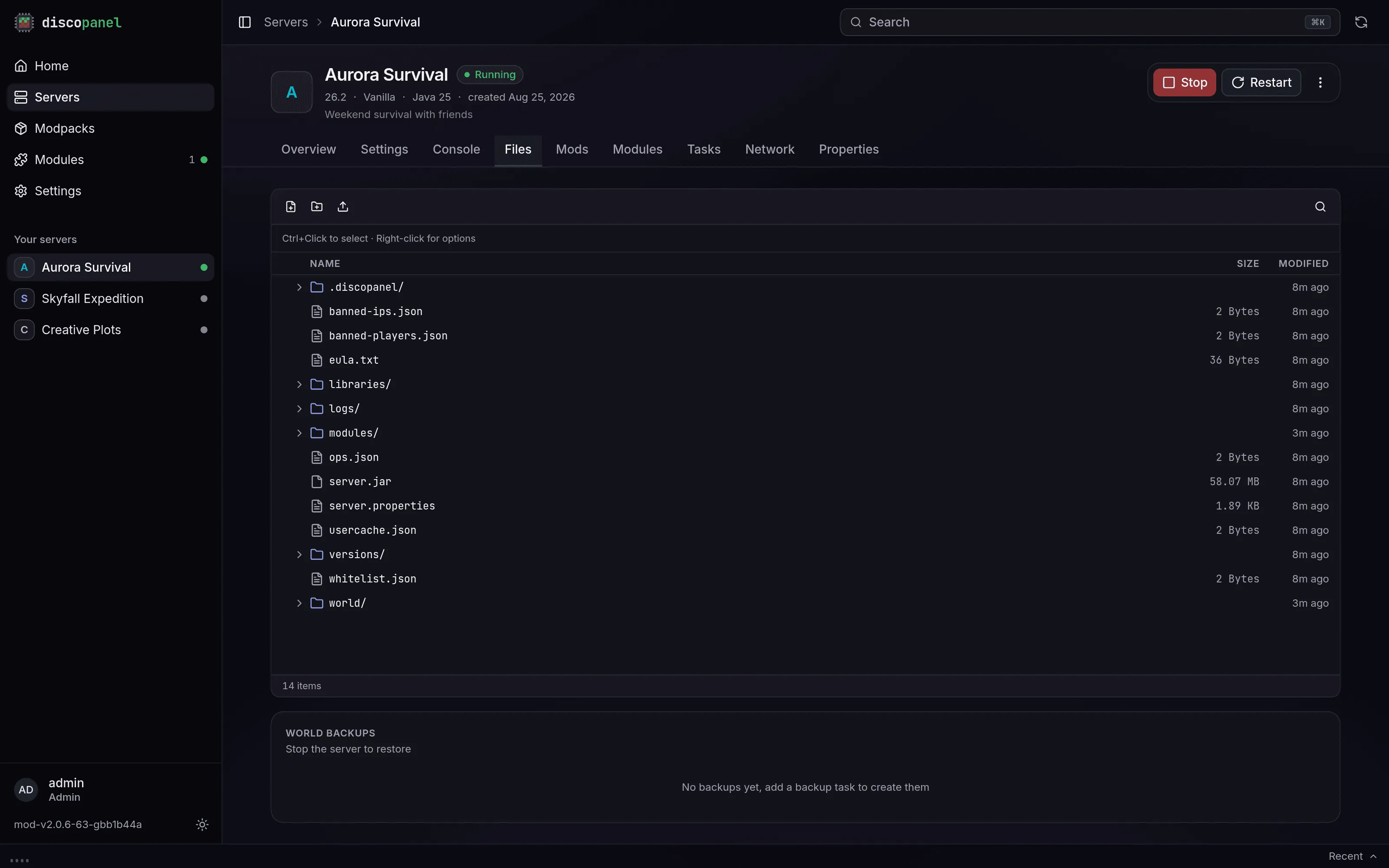
Every server gets its own folder, browsable from the Files tab. Worlds, mods, configs, logs, it’s all in there.
What you can edit freely
Section titled “What you can edit freely”Worlds, the mods and plugins folders, mod configs under config, datapacks, resource packs. DiscoPanel never deletes or overwrites files it didn’t put there.
What DiscoPanel manages
Section titled “What DiscoPanel manages”A few files are generated from your panel settings every time the server starts:
server.propertieseula.txtops.jsonandwhitelist.jsonserver-icon.png
Change these through the server’s Properties tab instead of the file editor, because hand edits to them get overwritten on the next start. Entries in server.properties that the panel doesn’t manage are kept, and you can add your own through the Custom Server Properties field.
The .discopanel folder
Section titled “The .discopanel folder”Each server folder contains a .discopanel folder where DiscoPanel keeps track of what it has installed. Leave it alone. If it goes missing, the server software gets reinstalled on the next start. Your world and mods would be safe, it just re-downloads things it already had.
Starting fresh
Section titled “Starting fresh”Force Re-Provision in the properties tab reinstalls the server software and modpack on the next start without touching your world, your configs, or the mods you added. It’s the fix for a broken install or a pack that won’t update.