FAQ
Answers to the questions that get asked over and over.
How do I update DiscoPanel?
Docker Compose
In the folder where your compose.yml file is, run:
docker compose downdocker pull ghcr.io/discohaus/discopaneldocker compose up -d
Proxmox Helper Script
Open the console for the container and enter update.
Binary / Source
Stop DiscoPanel, replace the binary with the new one from the releases page (or git pull and make build if you build from source), and start it again. Your data folder is untouched, and database migrations run automatically on startup.
How do I upgrade from v2 to v3?
Swap the binary or image and start it - the database migrates itself, with an automatic backup kept next to it. Come from v2.0.15 (boot that once first if you’re older), and expect each server’s first start to take longer while it reinstalls on the v3 runtime. Details in Upgrading from v2.
I’m using host networking but something is already on port 8080. How do I change the port?
If you’re using config.yaml, set this option:
server: port: "8080"Or set the DISCOPANEL_SERVER_PORT environment variable to whatever port you want.
How do I set up the proxy for my servers?
Enable it in your config with your domain, add a wildcard DNS record, and forward one port. Each server then gets an address like survival.mc.example.com. The Proxy & Domains guide has the full walkthrough.
Why does my server say “Sleeping”?
Auto-pause froze it because nobody was online. It still shows up in the server list, and joining wakes it in about a second. See the Auto-Pause guide.
How do I back up my servers?
Create a Backup task in your server’s Tasks tab. It archives your world data on a schedule (safely, even while the server is running) and prunes old backups based on the retention rules you set. See the Server Backups guide for full details, including how to restore.
How do I get an API key from CurseForge?
Why can’t I change my RAM allocation in the server JVM config?
Set the Memory field in the server’s overview section instead. That number is the total the server’s container gets, and DiscoPanel sizes the Java heap from it automatically - leaving headroom, because Java always needs some memory beyond the heap. If the heap were set to the full amount, the container would run out of memory and the server would crash.
Where do I find my logs?
In Settings > Logs.
I’m using Simple Voice Chat or Square/Dynmap and I want to expose that port. How do I do that?
This is best done using the ‘Additional Ports’ section of the overview tab of the server you want to adjust. At current there is no reverse proxy built into DiscoPanel for these, but Simple Voice Chat does have its own implementation that you should check out.
How do I stop DiscoPanel from updating my servers?
CurseForge
Packs don’t update on their own anymore. If you want to lock a server to a specific version anyway, set CurseForge Page URL or CurseForge File ID in the server properties.
For example, to pin ATM10 to v2.42:
CurseForge Page URL:https://www.curseforge.com/minecraft/modpacks/all-the-mods-10/files/6378501CurseForge File ID:6378501
More detail in the Modpacks guide.
Modrinth
Set the Modrinth Version field to a specific version to pin the pack. Packs never update on their own either way. See the Modpacks guide.
DiscoPanel keeps deleting the mods I upload. How do I stop it?
It doesn’t anymore. DiscoPanel never deletes files it didn’t install, so mods you upload to the mods folder stay put through restarts and pack updates. If you’d like DiscoPanel to fetch mods for you, use the Modrinth Projects field in the server properties.
Failed to start server: [failed_precondition] … etc
This is usually a permissions issue. DiscoPanel needs to write to its data directory, and server containers run as user 1000:1000 by default. Use ls -la to check permissions, chown to change ownership, and chmod to adjust permissions. More in Troubleshooting.
Issues related to Fuego, CurseForge API, or download errors in the server console
These are likely not something we can help with. Either your DNS isn’t working properly, CurseForge’s API is having issues, or your connection to CurseForge is otherwise blocked (e.g. by a firewall).
My CurseForge API key isn’t working.
Sometimes it takes a day or two for the key to start working in DiscoPanel when it works fine via curl or Postman. Sometimes it helps remaking the key once or twice too.
DiscoPanel ran out of memory or failed when uploading a file
Try uploading the file using scp or ftp to move it directly into the folder it needs to be in.
Make sure the file has the right permissions so DiscoPanel can read and write to it.
Does DiscoPanel have a widget?
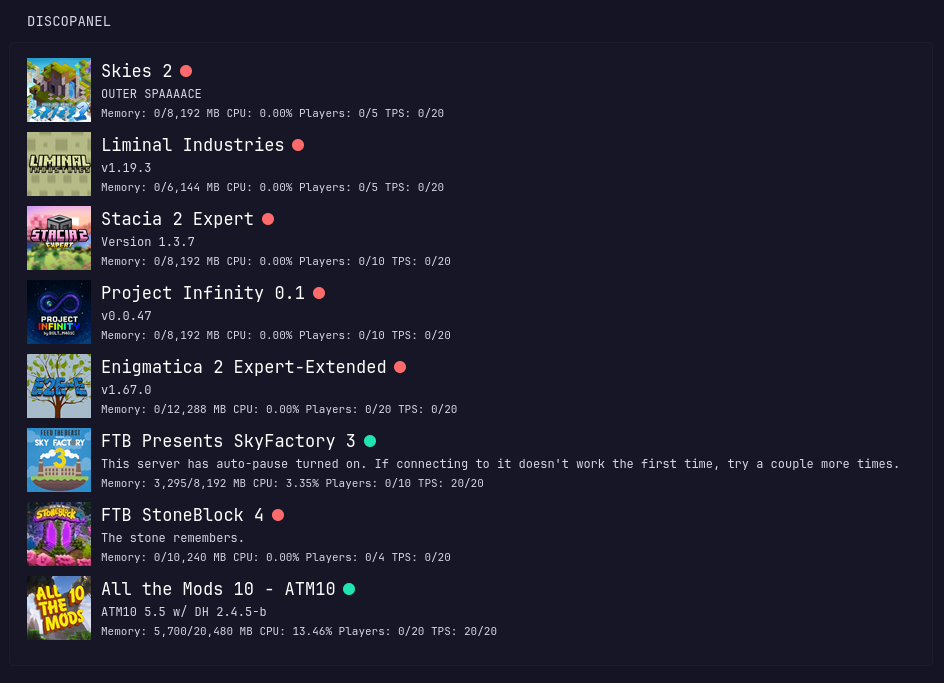
Yep! We have a Glance widget. It’s in the community repo but not yet merged at time of writing.