Modules
Modules are add-ons that run in their own little container next to a Minecraft server. Each server has a Modules tab where you can add them, start and stop them, and find their addresses. Modules can auto-start with the server, and DiscoPanel picks their ports for you.
The modules
Section titled “The modules” Geyser - Bedrock players join your Java server from phones and consoles.
 Status Panel - a shareable live dashboard for one server.
 Prometheus Exporter - server stats for Grafana and friends.
 Playit.gg - a free public address without port forwarding.
 Steam Bridge - friends join through Steam’s network.
 Doctor - automatic crash repair for modded servers.
 Discord Bot - chat bridge, announcements and slash commands for every server.
- BlueMap - a 3D map of your world in the browser.
Modules that ask for input
Section titled “Modules that ask for input”Some modules need a value from you while they run, like a Steam Guard code. A module signals this by serving a small prompt endpoint on its health port, and the panel surfaces it as a card at the top of the module dialog. Type the value, hit submit, and the panel hands it back to the module.
Building your own module? Serve GET /prompt returning the pending prompt as JSON (or 204 when nothing is waiting), and accept POST /prompt with {"id","value"}. The Go helper in pkg/moduleprompt does this for you. Set supports_prompts to true in the template metadata so the panel knows to poll.
Custom templates
Section titled “Custom templates”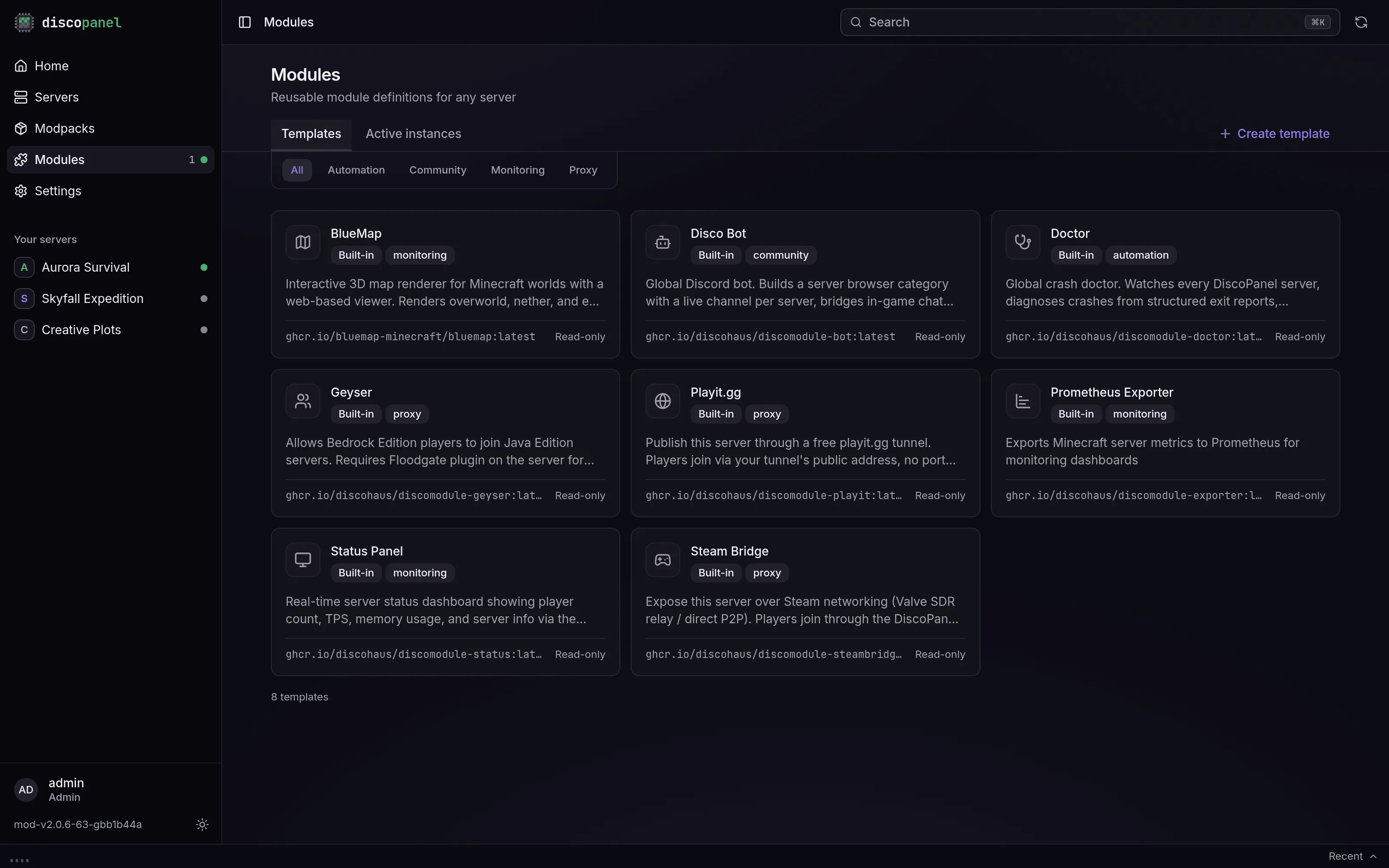
The built-in modules are templates, and admins can add their own: Modules page > Templates > Create template. A template is a Docker image plus everything an instance needs - the settings form its users fill in, default ports, environment, and volumes. Paths and values can use aliases like {{server.data_path}} and {{module.data_path}}, so one template works for every server. Anything that runs in a container and helps a Minecraft server is fair game.
Good to know
Section titled “Good to know”- Modules get their web ports assigned automatically (from the range in the panel’s
moduleconfig,8100-8199by default). The exact URL for each module is shown in its details. - A module belongs to one server. Two servers that both want BlueMap each get their own copy. Doctor and the Discord Bot are the exceptions, they work across the whole panel and live on the Modules page.
- Module files live inside the server’s folder under
modules/, so they’re covered by whatever you do with the server folder.