FAQ
Answers to the questions that get asked over and over.
How do I update Discopanel?
Docker Compose
In the folder where your compose.yml file is, run:
docker compose downdocker pull nickheyer/discopaneldocker compose up -d
Proxmox Helper Script
Open the console for the container and enter update.
Source
Download the new binary and run it.
Needs more specific documentation.
I’m using host networking but something is already on port 8080. How do I change the port?
If you’re using config.yaml, set this option:
server: port: "8080"Or set the DISCOPANEL_SERVER_PORT environment variable to whatever port you want.
How do I set up the proxy for my servers?
TODO
How do I get an API key from Curseforge?
Why can’t I change my RAM allocation in the server JVM config?
RAM maximums are adjusted via the Memory field in the overview section. It is done this way so that the minecraft docker container can have some amount of RAM available to handle all the other things it needs to do other than just run a minecraft server. The JVM allocation is then computed from the Memory value it is given to have enough space.
Where do I find my logs?
In Settings → Logs.
I’m using Simple Voice Chat or Square/Dynmap and I want to expose that port. How do I do that?
This is best done using the ‘Additional Ports’ section of the overview tab of the server you want to adjust. At current there is no reverse proxy built into Discopanel for these, but Simple Voice Chat does have its own implementation that you should check out.
How do I stop Discopanel from updating my servers?
Curseforge
Jump to the Curseforge config options of the desired server and edit the CF_URL, CF_FILE_ID, or CF_FILENAME_MATCHER fields to pin a specific version.
For example, to pin ATM10 to v2.42:
CF_URL:https://www.curseforge.com/minecraft/modpacks/all-the-mods-10/files/6378501CF_FILE_ID:6378501CF_FILENAME_MATCHER:2.42
More info in the itzg/docker-minecraft docs.
Modrinth
Refer to the itzg/docker-minecraft docs.
Discopanel keeps deleting the mods I upload. How do I stop it?
Curseforge
If you’re uploading a new mod, you can do it via:
- A download repo via the
CF_DOWNLOADS_REPOenvironment variable — just download the mods you want to that folder. - The
CURSEFORGE_FILESenvironment variable using the project ID and file ID for the mod you want.- For example, to add Distant Horizons v2.45-b, you would set
508933:7375285.
- For example, to add Distant Horizons v2.45-b, you would set
Both options are configured in the Docker Container Overrides section of the Overview tab. They are not currently exposed in the normal config options but are useful nonetheless.
Modrinth
Check here.
Failed to start server: [failed_precondition] … etc
This is usually a permissions issue. Discopanel runs Minecraft server containers as PUID:GID 1000:1000 by default, so if that user/group doesn’t have access to Discopanel’s install directory, you’ll hit this error. Use ls -la to check permissions, chown to change ownership, and chmod to adjust permissions.
Issues related to Fuego, Curseforge API, or download errors in the server console
These are likely not something we can help with. Either your DNS isn’t working properly, Curseforge’s API is having issues, or your connection to Curseforge is otherwise blocked (e.g. by a firewall).
Discopanel ran out of memory or failed when uploading a file
Try uploading the file using scp or ftp to move it directly into the folder it needs to be in.
Make sure the file has the right permissions so Discopanel can read and write to it.
Does Discopanel have a widget?
Yep! We have a Glance widget. It’s in the community repo but not yet merged at time of writing.
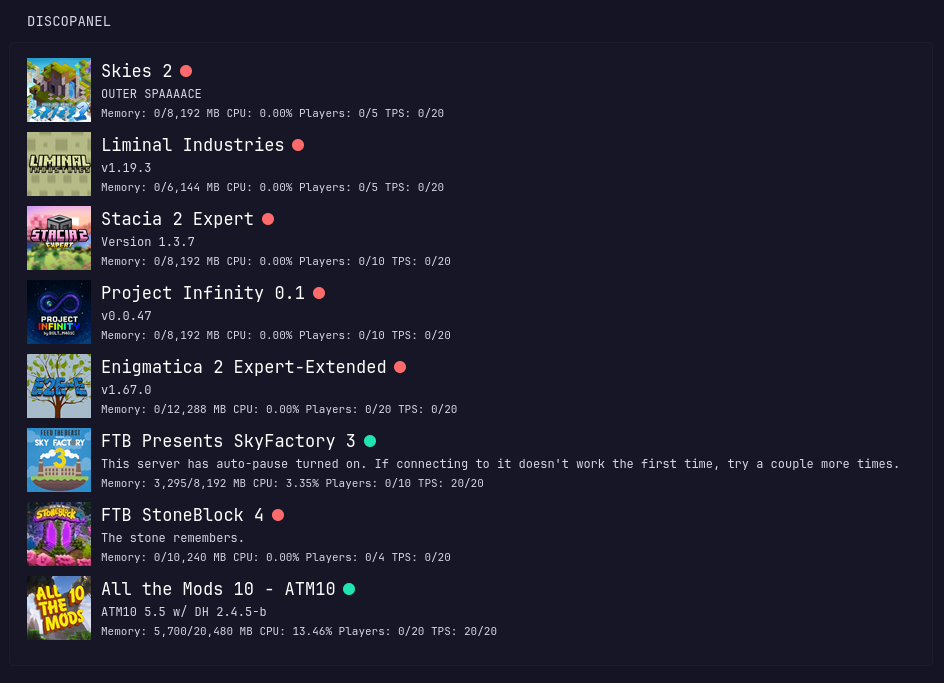
This section is a work in progress.